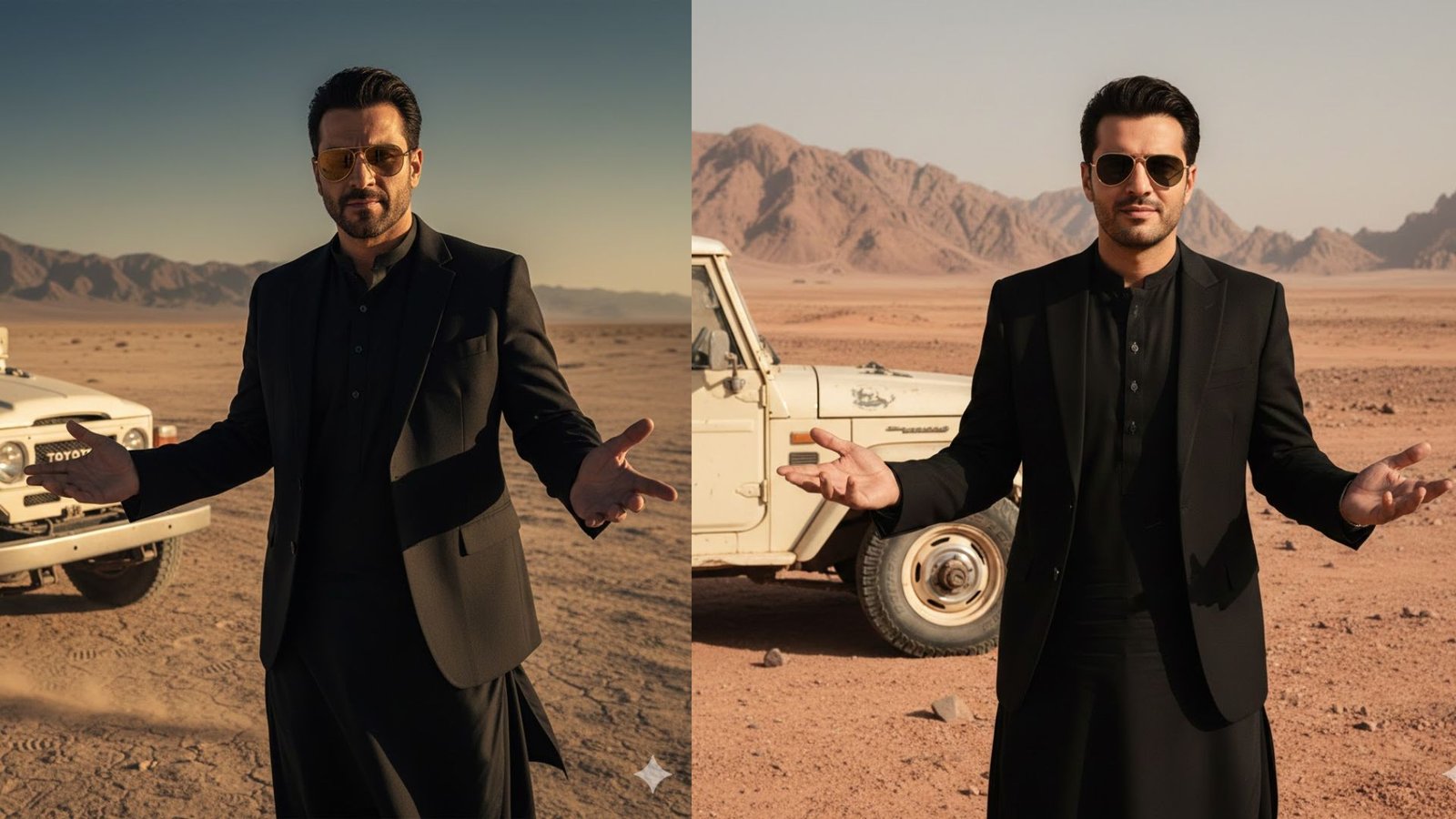
To generate a high-quality cinematic photo in Gemini, it is very important to understand how to structure and use a prompt correctly. Gemini responds best when the prompt clearly explains the subject, clothing, pose, environment, mood, and camera style. The given prompt is already strong, but using it properly inside Gemini makes a big difference in the final output.
The first step is to clearly define the main subject. In this case, the subject is a charismatic man wearing gold-rimmed aviator sunglasses. Mentioning specific accessories like sunglasses helps Gemini visualize the character more accurately. Describing his expression—such as confident or slightly smirking—adds personality and emotion to the image, making it feel more realistic and cinematic.
Next, clothing details are very important. The prompt specifies a stylish black suit jacket worn over a black traditional tunic (shalwar kameez). This combination of modern and traditional clothing should be written clearly in one sentence so Gemini understands that both elements must appear together. Using words like “stylish,” “traditional,” and “black-on-black” helps guide the fashion tone and color palette.
After the appearance, the pose and body language must be explained. In this prompt, the man is gesturing outward with both open palms in a “what can you do?” pose. This kind of descriptive body language is crucial because Gemini often struggles with gestures unless they are clearly stated. Mentioning that the pose looks confident or casual helps reinforce the emotion.
The background and environment should be described next. Here, the setting is a dusty, desolate desert or mountainous terrain. Words like “dusty,” “desolate,” and “open landscape” help Gemini avoid urban or green environments. Adding environmental mood—such as harsh sunlight or dry air—can further improve realism.
Including secondary elements is another important step. The partial view of a white vintage off-road vehicle, like a Land Cruiser, gives the image a cinematic storytelling feel. It’s important to specify that the vehicle should be partially visible and placed to the left of the subject so it does not overpower the main character.
To get the best results in Gemini, you should also add visual style and quality instructions at the end of the prompt. For example, mentioning “photorealistic,” “cinematic lighting,” “high resolution,” and “sharp focus” helps Gemini generate a professional-looking image rather than an illustration.
When entering the prompt into Gemini, paste it as one complete description rather than breaking it into multiple messages. Avoid adding unnecessary emojis or casual language. If Gemini generates a square image and you want a portrait or landscape format, explicitly mention the desired orientation like “portrait orientation” or “cinematic wide shot.”
Finally, patience and minor adjustments are key. If the first result is not perfect, slightly refine the prompt by strengthening words like “ultra-realistic,” “dramatic,” or “editorial-style portrait.” Gemini works best when it is guided clearly but not overloaded with conflicting instructions.
Using this structured approach, the given prompt can successfully generate a powerful, cinematic photo that looks confident, stylish, and story-driven.
Prompt
Charismatic, a man with a gold-rimmed aviator sunglasses. He is wearing a stylish black suit jacket over a black traditional tunic (shalwar kameez). He has a slightly smirking or confident expression and is gesturing outwards with both open palms in a ‘what can you do? pose. He is standing in a dusty, desolate desert or mountainous terrain. A partial view of a white, vintage off-road vehicle (like a Land Cruiser)is visible to his left.
Leave a Reply