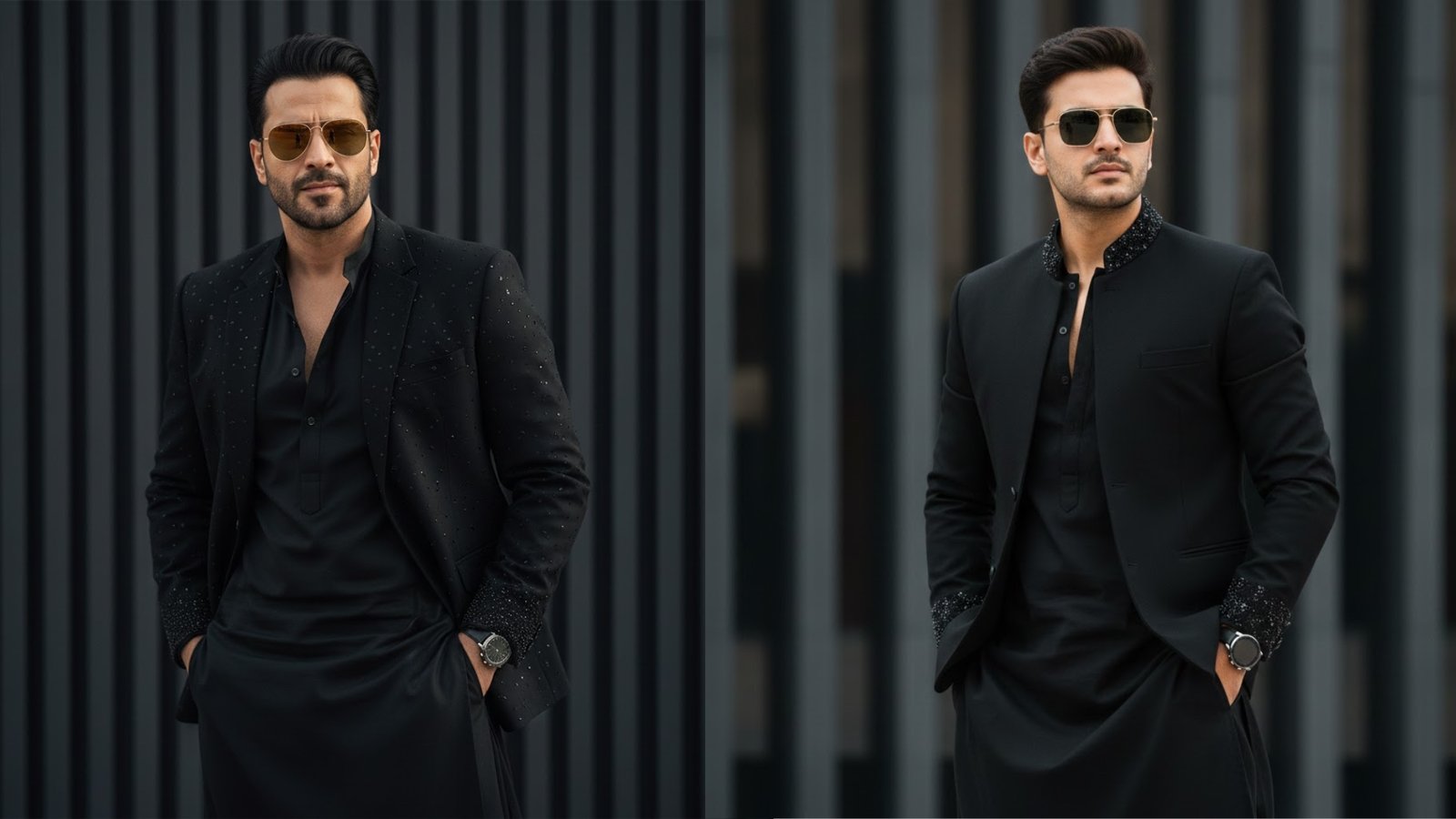
Creating a high-quality, fashion-forward portrait in Gemini becomes much easier when you clearly explain identity locking, outfit styling, pose, background, and visual quality. The key challenge in this prompt is maintaining the same face from a reference photo while changing the outfit, pose, and background. Gemini can handle this well if the prompt is structured correctly and written with clarity.
The first and most important step is locking the facial identity. When you want Gemini to keep the same face, hairstyle, and beard style as an uploaded reference image, this instruction must appear early and clearly in the prompt. Phrases like “use the reference photo above” and “keep the same face as uploaded” signal to Gemini that facial features should not be altered. This helps prevent unwanted face changes while allowing styling and environment changes.
Next, define the overall personality and mood of the subject. Words like “stylish,” “confident,” and “cool” help Gemini understand the attitude and body language. In this case, describing the man as confident with hands in pockets sets a relaxed yet powerful fashion pose. Adding details such as light stubble and reflective aviator sunglasses further reinforces the modern, charismatic look.
Clothing description plays a major role in achieving the desired result. The prompt specifies an all-black, modern Indo-western outfit, which blends traditional and contemporary fashion. Mentioning elements like subtle bead and sequin embellishments, a kurta-style top, and a jacket left slightly open at the chest gives Gemini enough visual detail to design a premium outfit without confusion. Keeping the color palette simple (all-black) also improves consistency.
The background and composition are equally important. A softly blurred, vertical-striped dark background ensures the focus stays on the subject while adding a studio-style, editorial feel. Gemini responds well to clear background instructions, especially when you want a clean, fashion-shoot aesthetic rather than a busy environment.
Accessories and finishing touches elevate realism. Including a sleek wristwatch, sunglasses, and refined grooming details tells Gemini to treat the image like a professional fashion portrait. These small elements often make the difference between an average image and a high-end result.
Camera and quality instructions should be implied or lightly stated. While the prompt does not explicitly mention camera type, Gemini generally understands fashion prompts better when they imply studio lighting, sharp focus, and a polished look. You can optionally add words like “photorealistic,” “studio lighting,” or “high-resolution” if needed, but the current prompt already leans strongly toward realism.
Below is the exact prompt you should paste into Gemini, along with the uploaded reference image:
Prompt:
“A stylish, confident man use the reference photo above keep the same face as uploaded poses against a softly blurred, vertical-striped dark background, wearing an all-black, modern Indo-western outfit with subtle bead and sequin embellishments on the jacket and kurta-style top left slightly open at the chest, light stubble, reflective aviator sunglasses, and a sleek wristwatch, with hands in pockets and a cool. good looking the man has the same face, hairstyle, and beard style as in the reference.”
When using this in Gemini, always upload the reference image first, then paste the prompt as a single block of text. Avoid splitting instructions across messages. If the result needs refinement, gently reinforce identity locking by adding lines like “do not change facial features” or “same facial structure as reference.”
By clearly defining identity, fashion, pose, and background, Gemini can generate a polished, editorial-style portrait that stays true to the original face while delivering a bold, modern Indo-western look.
Leave a Reply