Category: Blog

Your blog category

  • How to Generate a 16K Ultra-Realistic Child Portrait in Gemini Using a Detailed Prompt

    How to Generate a 16K Ultra-Realistic Child Portrait in Gemini Using a Detailed Prompt

    Creating a high-quality, ultra-realistic image of a child in Gemini requires extra clarity, structure, and responsibility in prompt writing. Gemini responds best when the subject’s age, styling, pose, environment, and camera quality are explained clearly and respectfully. When done correctly, Gemini can produce a professional, cinematic image that looks like it was captured with a high-end DSLR camera.

    The first and most important step is to clearly define the age of the subject. Stating “6 year old boy” at the very beginning of the prompt helps Gemini maintain correct body proportions, facial softness, and child-appropriate expressions. This avoids the common issue where AI accidentally makes children look older. Age clarity is essential for realism.

    Next, describe the overall personality and pose. Words like “stylish,” “attitude posing,” and “confident” help Gemini understand body language without exaggeration. Adding details such as “messy volume hair” gives the image a natural, playful look while still appearing fashionable. Mentioning “right side face focus” helps control composition and ensures the face is clearly visible and emphasized.

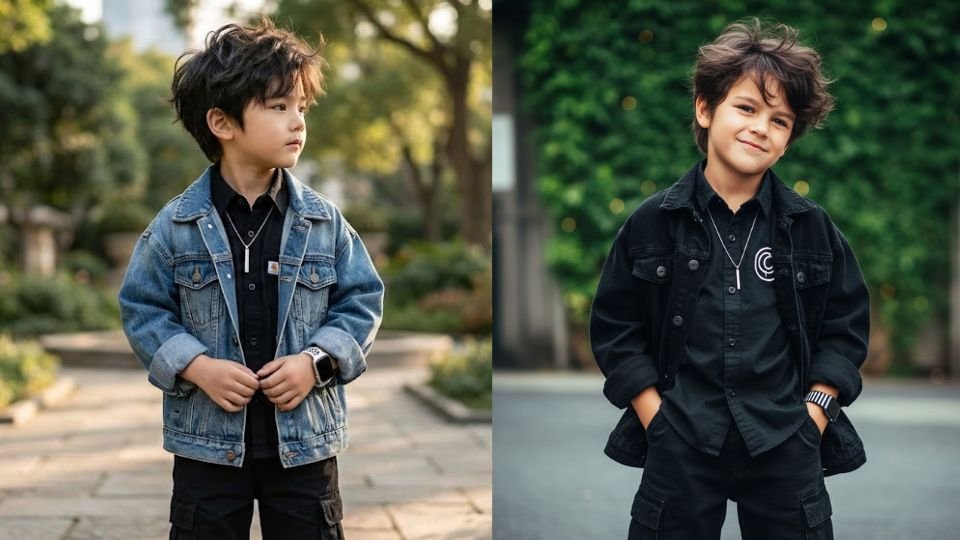
    Clothing details should be specific and layered, but still appropriate for a child. In this prompt, the outfit includes an oversized denim jacket, a black button-up shirt, black baggy cargo pants, a vertical bar pendant, and a black-and-white Apple Watch. Listing each item separately helps Gemini generate accurate textures, proportions, and layering. Accessories like a pendant and watch add realism and modern style without overpowering the subject.

    The environment is another critical factor. A “vibrant natural setting” combined with “lush urban vibes softly blurred” tells Gemini to mix greenery with a modern background. This contrast creates a cinematic lifestyle look. Mentioning a softly blurred background instructs Gemini to apply shallow depth of field, which keeps the boy sharp while the background fades naturally.

    Lighting and image quality instructions strongly influence the final output. Terms like “16K ultra-realistic,” “cinematic lighting,” and “DSLR-quality image” push Gemini toward maximum sharpness, realistic skin texture, and professional color grading. While Gemini may not truly output 16K resolution, these words signal that the highest possible detail and realism are expected.

    Below is the exact prompt you should paste into Gemini:

    Prompt:
    “6 year old boy. 16K ULTRA-REALISTIC CREATE IMAGE. A STYLISH BOY WITH MESSY VOLUME HAIR, ATTITUDE POSING OUTDOORS IN A VIBRANT NATURAL SETTING. Oversized Denim Jacket, Black Shirt Button Up, Both Hands With a Logo, Black Baggy Cargo Pants, a Vertical Bar Pendant, and a Black and White Apple Watch. The background is lush, urban vibes softly blurred black with cinematic lighting, creating an ultra-realistic DSLR-quality image. (Right side face focus use face.)”

    When using this prompt in Gemini, paste it as a single block of text. Avoid emojis or unnecessary wording. If Gemini returns a square image and you want a vertical one, add a final line such as “Portrait orientation, 9:16.”

    If the output needs improvement, refine gently. Reinforce phrases like “natural child proportions,” “realistic lighting,” or “sharp face focus” instead of rewriting everything.

    By clearly defining age, outfit, pose, environment, and camera quality, this prompt allows Gemini to generate a polished, modern, and ultra-realistic child portrait that feels professional, cinematic, and visually impressive.

  • How to Create a Hyper-Realistic Winter Mountain Portrait in Gemini Using a Cinematic Prompt

    How to Create a Hyper-Realistic Winter Mountain Portrait in Gemini Using a Cinematic Prompt

    Creating a hyper-realistic, cinematic image in Gemini requires a well-structured prompt that clearly explains the subject, environment, clothing, mood, and visual quality. Gemini performs best when the prompt is descriptive but organized, allowing the model to understand what must be realistic, what should feel cinematic, and what emotional tone the image should convey.

    The first step is defining the overall visual style and quality. Words like “hyper-realistic,” “8K,” and “cinematic shot” immediately signal to Gemini that the image should look like a high-end photograph rather than an illustration or digital artwork. These terms guide the lighting, texture detail, and depth of field, resulting in a professional, movie-like appearance.

    Next, the subject description must be clear and specific. In this prompt, the subject is a stylish young man with voluminous dark hair styled upward and a light beard. Mentioning grooming details such as hairstyle and facial hair helps Gemini maintain consistency and realism. Adding dark sunglasses and a contemplative expression further defines the personality and mood of the character.

    The pose and body language are also important. Describing the man as “sitting on a jagged, snow-dusted rock” instantly grounds him in the environment and avoids unnatural standing poses. Saying that he is “looking off to the side” gives direction to the gaze, which helps Gemini compose the frame more naturally and creates a thoughtful, cinematic feel.

    Clothing details play a major role in realism. Listing each clothing item separately—grey denim jacket, black t-shirt, black cargo pants, white and black sneakers, and a black-and-white checkered scarf—helps Gemini generate accurate textures, layering, and color balance. The scarf wrapped loosely around the neck adds movement and style, making the image feel less static.

    The environment and background bring the cinematic effect to life. A “majestic winter mountain landscape” with snow-dusted rocks suggests scale, cold temperature, and dramatic scenery. Mentioning a “soft-focus background” is especially important, as it instructs Gemini to apply shallow depth of field, keeping the subject sharp while gently blurring the surroundings. This technique is commonly used in professional photography and greatly enhances realism.

    Below is the exact prompt you should paste into Gemini to generate this image:

    Prompt:
    “A hyper-realistic, 8k cinematic shot of a stylish young man sitting on a jagged, snow-dusted rock in a majestic winter mountain landscape. He has voluminous dark hair styled upward and a light beard, wearing dark sunglasses and looking off to the side with a contemplative expression. He is dressed in a grey denim jacket, a black t-shirt, black cargo pants, and white black sneakers. A black and white checkered scarf is wrapped loosely around his neck. The background features a soft-focus.”

    When using this prompt in Gemini, paste it as a single block of text. Avoid adding emojis or unrelated instructions. If Gemini outputs a square image and you want a vertical or cinematic framing, you can add a final line such as “portrait orientation 9:16” or “cinematic wide framing.”

    If the first result is not perfect, refine gently. Strengthen phrases like “ultra-realistic textures,” “natural cold daylight,” or “DSLR-style depth of field” rather than rewriting the entire prompt. Small adjustments often lead to better results.

    By clearly defining realism, fashion, pose, environment, and camera depth, this prompt allows Gemini to generate a striking winter portrait that feels cinematic, stylish, and professionally photographed.

  • How to Create a Reference-Accurate, Ultra-Realistic Portrait in Gemini Using a Detailed Prompt

    How to Create a Reference-Accurate, Ultra-Realistic Portrait in Gemini Using a Detailed Prompt

    Generating a highly realistic portrait in Gemini—especially one that must closely match a real person’s face—requires careful prompt structure, clear identity instructions, and strong visual guidance. Gemini can produce excellent results when it is told exactly what must remain unchanged and what elements can be styled creatively.

    The most important step is identity locking. When you want the generated image to match the uploaded photo exactly, you must clearly instruct Gemini to keep the face identical. This instruction should appear at the very beginning of the prompt so the model prioritizes facial accuracy over styling. Words such as “100% identical,” “same facial structure,” or “reference-accurate face” help Gemini understand that facial features must not be altered.

    Next, define the expression and makeup style. A “soft sweet smile” immediately sets a gentle emotional tone. Describing makeup as “sweet dreamy brown tone” helps Gemini apply subtle, natural-looking cosmetics instead of heavy or dramatic makeup. Clear emotional and aesthetic cues prevent the image from looking artificial.

    Hair details should be written clearly. Mentioning “long wavy hair” allows Gemini to add natural flow and softness to the portrait. Hair description is important because it frames the face and strongly affects likeness.

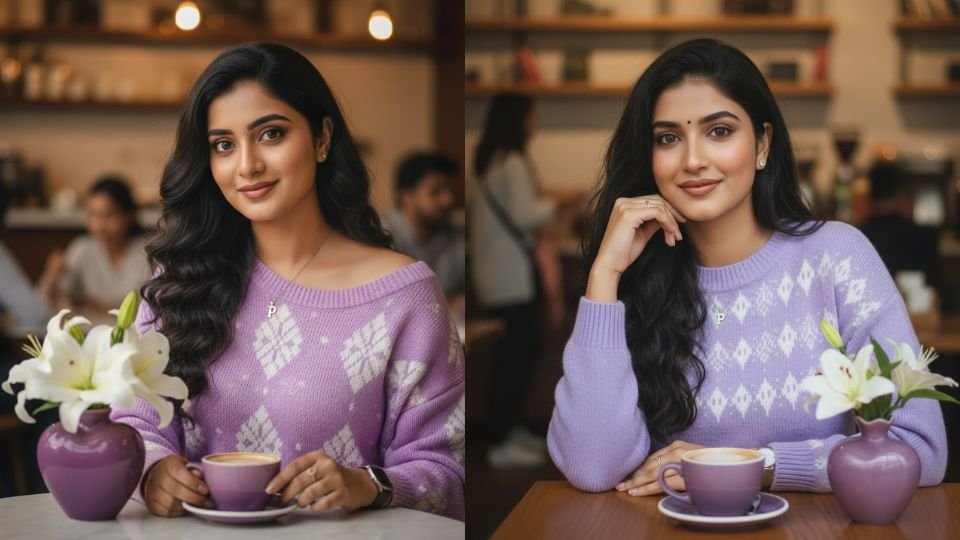
    Clothing and accessories should be listed in a structured way. In this prompt, the outfit is a light bright purple knitted sweater with alternating white patterns and one shoulder exposed. This level of detail helps Gemini accurately design textures, colors, and fit. Accessories such as a necklace with a “P” pendant, a wristwatch, and a ring on the right index finger add realism and personality. Specifying which finger the ring is on reduces ambiguity and improves accuracy.

    The environment adds storytelling value. A coffee shop setting creates a cozy, lifestyle mood. Including specific props—such as a heart-shaped purple vase with white lilies and a purple coffee cup—helps Gemini arrange the scene naturally and maintain color harmony. Small decorative elements often make the image feel more cinematic and intentional.

    Image quality instructions are also essential. Terms like “ultra-sharp 8K image” tell Gemini to aim for maximum clarity, realistic textures, and professional photographic detail. While Gemini may not literally output true 8K resolution, these words strongly push it toward the highest possible visual fidelity.

    Below is the exact prompt you should paste into Gemini after uploading the reference photo:

    Prompt:
    “Generate an image of a face that is 100% identical to the person in the photo, with a soft sweet smile, makeup in a sweet dreamy brown tone, ultra-sharp 8K image, long wavy hair, wearing a light bright purple knitted sweater with alternating white patterns and one shoulder exposed, wearing a necklace with a ‘P’ pendant, a wristwatch, and a ring on the right index finger, sitting in a coffee shop with a heart-shaped purple vase containing white lilies on the table, a purple coffee cup.”

    When using this prompt, always upload the reference image first, then paste the prompt as a single block of text. Avoid splitting instructions across messages. If Gemini slightly changes facial features, reinforce identity by adding a short line such as “do not change facial structure, eyes, nose, or lips.”

    By clearly locking the face, carefully describing styling and environment, and emphasizing ultra-realistic quality, Gemini can generate a polished, lifestyle portrait that looks natural, expressive, and visually stunning while staying faithful to the original person.

  • How to Create an 8K Ultra-Realistic Cinematic Portrait in Gemini Using a Detailed Prompt

    How to Create an 8K Ultra-Realistic Cinematic Portrait in Gemini Using a Detailed Prompt

    Generating a high-quality, ultra-realistic cinematic portrait in Gemini requires clear instructions about identity accuracy, motion, clothing, environment, and image format. Gemini performs best when prompts are descriptive, structured, and focused on visual clarity rather than vague artistic language. The prompt you provided is a strong example of how to guide Gemini toward a professional, fashion-editorial result.

    The first and most important element in this prompt is face consistency. By mentioning “reference-accurate face,” you clearly instruct Gemini to preserve the facial identity from the uploaded reference image. When using Gemini, you should always upload the reference image first and then paste the prompt. This order helps Gemini understand which face must remain unchanged while allowing changes in outfit, pose, and environment.

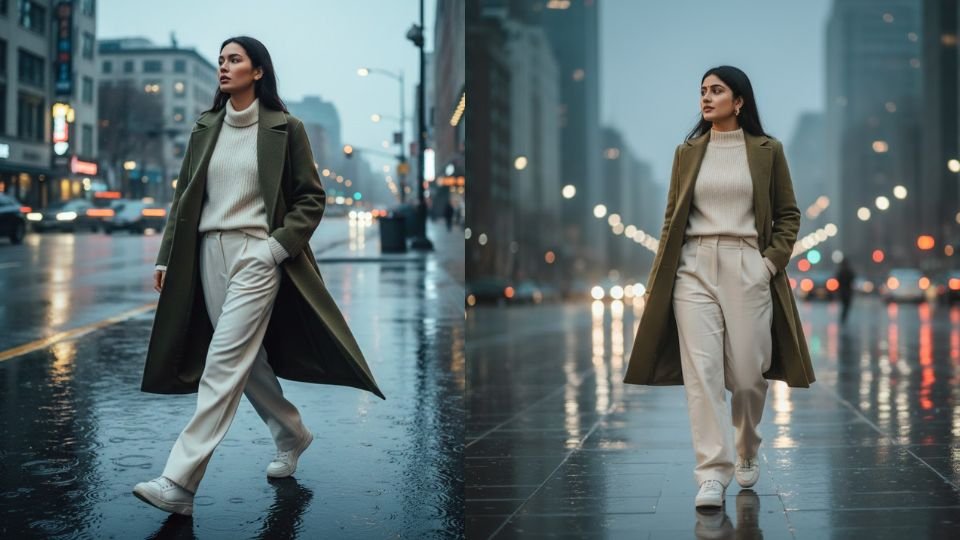
    Next, the action and motion are crucial. Describing the subject as “walking confidently across rain-slick, reflective pavement” and “captured mid-stride” gives Gemini a clear sense of dynamic movement. Many AI-generated images look static unless motion is explicitly mentioned. Words like “mid-stride,” “natural,” and “dynamic” help Gemini produce a realistic walking posture rather than an awkward standing pose.

    The environment adds cinematic depth. A rain-slick pavement with reflections instantly creates a dramatic, high-fashion mood. This type of surface also helps Gemini add light reflections and contrast, which are essential for a cinematic look. Mentioning reflective pavement encourages realistic lighting behavior rather than flat textures.

    Clothing description is another key factor. The prompt specifies a coordinated olive-toned outfit with multiple layers, which helps Gemini understand both color harmony and fashion style. Details like a “premium olive Korean overcoat,” “cream high-neck knit sweater,” “off-white oversized baggy trousers,” and “white designer sneakers” give Gemini very clear styling instructions. Listing each clothing item separately avoids confusion and improves accuracy.

    Body language and attitude are also important. Mentioning that one hand is “casually tucked halfway into the pocket” adds a relaxed, confident vibe. Small details like this significantly improve realism and help the image feel editorial rather than posed. The direction of the gaze—“directed to the left”—further improves composition and storytelling.

    Image quality and format instructions should be explicit. Terms like “8K,” “ultra-realistic,” “full-body,” and “9:16 cinematic portrait” strongly guide Gemini toward high-resolution, vertical images suitable for reels, shorts, or fashion thumbnails. If Gemini sometimes outputs square images, adding “vertical portrait orientation, 9:16 only” at the end can help enforce the format.

    Below is the exact prompt you should paste into Gemini, after uploading the reference image:

    Prompt:
    “8K ultra-realistic full-body 9:16 cinematic portrait of a young woman (reference-accurate face) walking confidently across rain-slick, reflective pavement. His gaze is directed to the left, captured mid-stride with a natural, dynamic motion. she wears a stylish olive-toned outfit: a premium olive Korean overcoat, a cream high-neck knit sweater, off-white oversized baggy trousers, and white designer sneakers. One hand is casually tucked halfway into his pocket, adding effortless style.”

    When using this prompt, paste it as a single block of text. Avoid adding extra emojis or unrelated instructions. If the output needs refinement, strengthen words like “photorealistic,” “natural lighting,” or “cinematic depth of field” rather than rewriting the entire prompt.

    By combining identity locking, motion clarity, detailed fashion styling, and strict format instructions, Gemini can generate a powerful, modern, cinematic portrait that looks professional, realistic, and visually striking.

  • How to Generate a Cinematic Portrait of an Assamese Woman in Gemini Using a Detailed Prompt

    How to Generate a Cinematic Portrait of an Assamese Woman in Gemini Using a Detailed Prompt

    Creating a visually rich, cultural, and cinematic portrait in Gemini depends largely on how clearly you describe the subject, attire, location, mood, and visual quality. Gemini is very responsive to prompts that balance cultural detail with photography-style instructions. The given prompt is a strong example of how to achieve an elegant and realistic result when used correctly.

    The first step in generating this image in Gemini is to clearly define the main subject. In this case, the subject is a beautiful young Assamese woman. Mentioning her regional identity is important because it helps Gemini understand facial features, attire style, and cultural context. Words like “beautiful,” “young,” and “graceful” guide the overall tone of the portrait without making it exaggerated.

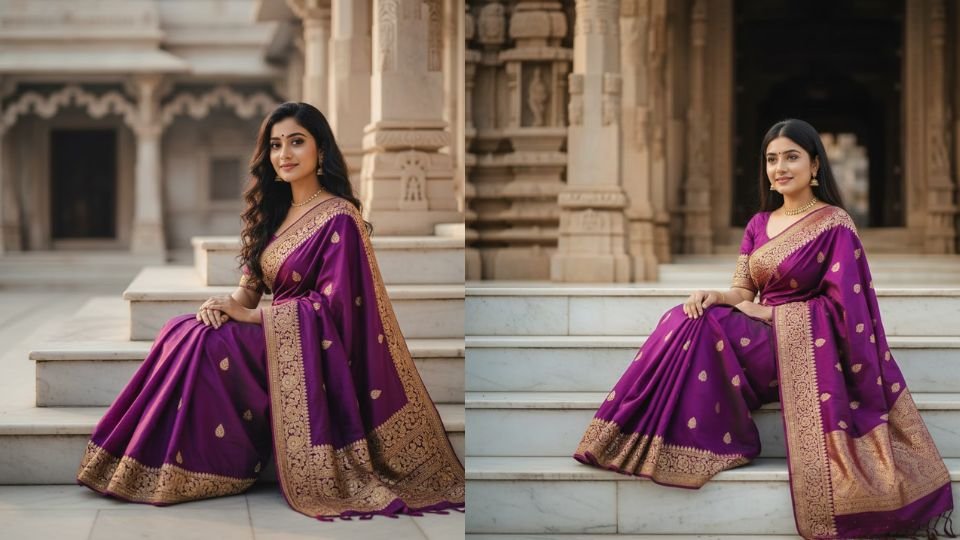
    Next, the pose and posture must be clearly stated. Describing the woman as “sitting gracefully on the marble steps” immediately sets a calm, composed, and elegant body language. Gemini often struggles with vague poses, so specifying sitting posture and grace helps maintain realism and avoids awkward positioning.

    The location plays a crucial role in the image. A “traditional temple courtyard” with marble steps gives a strong sense of heritage and serenity. Gemini responds well to culturally rich locations, especially when they are described with architectural elements like marble, courtyards, or temple surroundings. This ensures the background looks authentic and not generic.

    Clothing details are one of the most important parts of this prompt. The Mekhela Chador is a traditional Assamese outfit, and describing it in detail helps Gemini generate it accurately. Words like “vibrant deep purple,” “intricate golden zari embroidery,” and “matching blouse” clearly define the color palette, texture, and craftsmanship. This level of detail prevents Gemini from simplifying or misrepresenting the attire.

    Hair, jewelry, and expression further refine the portrait. Mentioning “long, dark flowing hair” gives natural movement and softness to the image. “Minimal elegant jewelry” avoids over-decoration and keeps the look refined. A “soft smile” adds warmth and emotional connection, which is essential for portrait photography.

    To achieve a professional result, visual quality cues such as “high-quality” and “cinematic portrait” are extremely important. These terms guide Gemini toward realistic lighting, shallow depth of field, and a polished photographic look rather than an illustration. You can also add optional phrases like “natural sunlight,” “soft shadows,” or “photorealistic” if you want even more realism.

    Below is the exact prompt you should paste into Gemini to generate this image:

    Prompt:
    “Create a high-quality, cinematic portrait of a beautiful young Assamese woman sitting gracefully on the marble steps of a traditional temple courtyard. She is wearing a vibrant deep purple Mekhela Chador with intricate golden zari embroidery and a matching blouse. She has long, dark flowing hair, minimal elegant jewelry, and a soft smile.”

    When using this prompt in Gemini, paste it as a single block of text. Avoid adding unrelated instructions or emojis. If Gemini produces a square image and you prefer a vertical or horizontal frame, you can add a final line such as “portrait orientation, 9:16” or “cinematic vertical framing.”

    If the first result is not perfect, make small refinements rather than rewriting the entire prompt. Strengthening words like “ultra-realistic,” “natural lighting,” or “DSLR-style photography” can improve the output while preserving the original intent.

    By combining cultural clarity, precise attire description, and cinematic photography cues, this prompt allows Gemini to generate an elegant, respectful, and visually stunning portrait rooted in Assamese tradition.

  • How to Generate a Stylish Indo-Western Portrait in Gemini Using a Reference Face

    How to Generate a Stylish Indo-Western Portrait in Gemini Using a Reference Face

    Creating a high-quality, fashion-forward portrait in Gemini becomes much easier when you clearly explain identity locking, outfit styling, pose, background, and visual quality. The key challenge in this prompt is maintaining the same face from a reference photo while changing the outfit, pose, and background. Gemini can handle this well if the prompt is structured correctly and written with clarity.

    The first and most important step is locking the facial identity. When you want Gemini to keep the same face, hairstyle, and beard style as an uploaded reference image, this instruction must appear early and clearly in the prompt. Phrases like “use the reference photo above” and “keep the same face as uploaded” signal to Gemini that facial features should not be altered. This helps prevent unwanted face changes while allowing styling and environment changes.

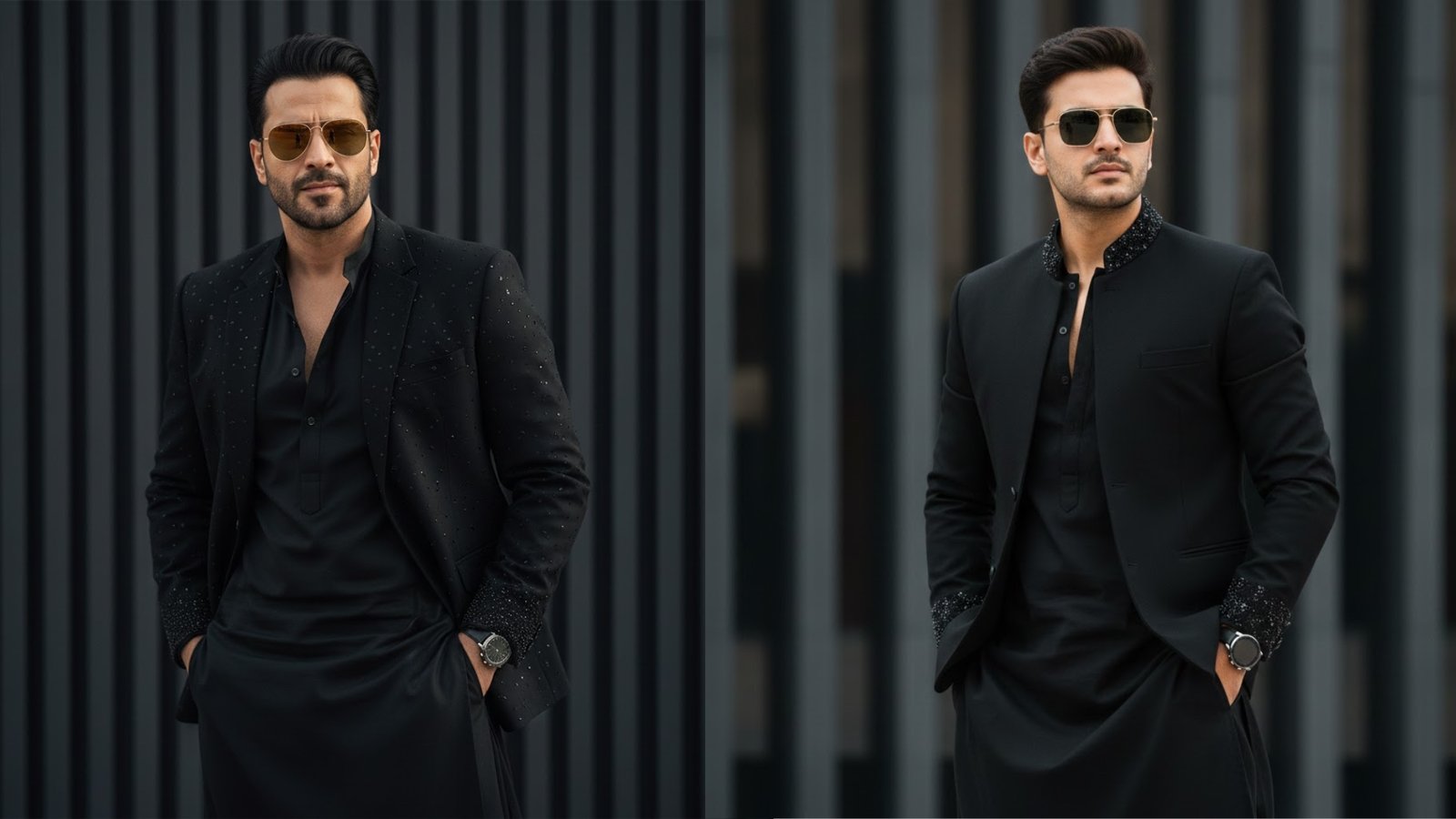
    Next, define the overall personality and mood of the subject. Words like “stylish,” “confident,” and “cool” help Gemini understand the attitude and body language. In this case, describing the man as confident with hands in pockets sets a relaxed yet powerful fashion pose. Adding details such as light stubble and reflective aviator sunglasses further reinforces the modern, charismatic look.

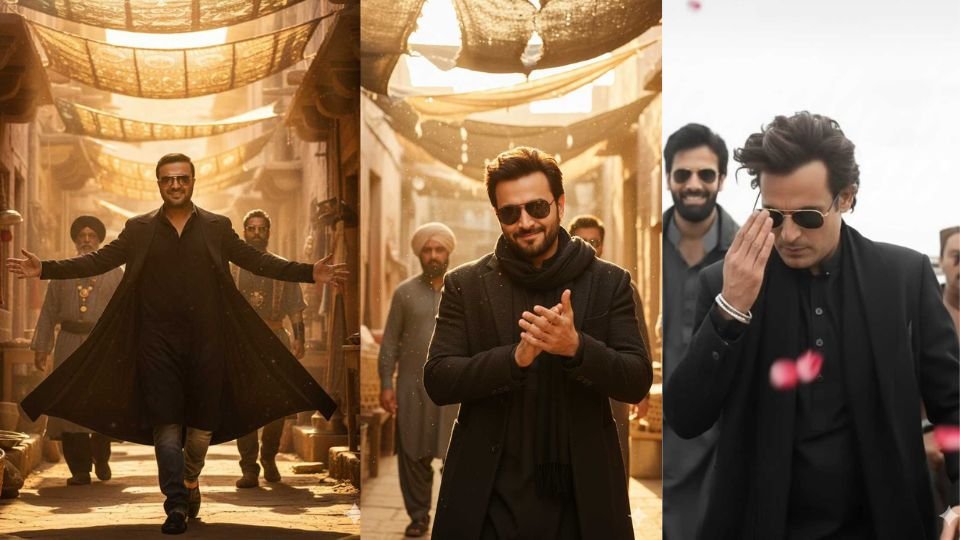
    Clothing description plays a major role in achieving the desired result. The prompt specifies an all-black, modern Indo-western outfit, which blends traditional and contemporary fashion. Mentioning elements like subtle bead and sequin embellishments, a kurta-style top, and a jacket left slightly open at the chest gives Gemini enough visual detail to design a premium outfit without confusion. Keeping the color palette simple (all-black) also improves consistency.

    The background and composition are equally important. A softly blurred, vertical-striped dark background ensures the focus stays on the subject while adding a studio-style, editorial feel. Gemini responds well to clear background instructions, especially when you want a clean, fashion-shoot aesthetic rather than a busy environment.

    Accessories and finishing touches elevate realism. Including a sleek wristwatch, sunglasses, and refined grooming details tells Gemini to treat the image like a professional fashion portrait. These small elements often make the difference between an average image and a high-end result.

    Camera and quality instructions should be implied or lightly stated. While the prompt does not explicitly mention camera type, Gemini generally understands fashion prompts better when they imply studio lighting, sharp focus, and a polished look. You can optionally add words like “photorealistic,” “studio lighting,” or “high-resolution” if needed, but the current prompt already leans strongly toward realism.

    Below is the exact prompt you should paste into Gemini, along with the uploaded reference image:

    Prompt:
    “A stylish, confident man use the reference photo above keep the same face as uploaded poses against a softly blurred, vertical-striped dark background, wearing an all-black, modern Indo-western outfit with subtle bead and sequin embellishments on the jacket and kurta-style top left slightly open at the chest, light stubble, reflective aviator sunglasses, and a sleek wristwatch, with hands in pockets and a cool. good looking the man has the same face, hairstyle, and beard style as in the reference.”

    When using this in Gemini, always upload the reference image first, then paste the prompt as a single block of text. Avoid splitting instructions across messages. If the result needs refinement, gently reinforce identity locking by adding lines like “do not change facial features” or “same facial structure as reference.”

    By clearly defining identity, fashion, pose, and background, Gemini can generate a polished, editorial-style portrait that stays true to the original face while delivering a bold, modern Indo-western look.

  • How to Generate a Realistic Cinematic Photo in Gemini Using a Detailed Prompt

    How to Generate a Realistic Cinematic Photo in Gemini Using a Detailed Prompt

    Creating a high-quality, realistic photo in Gemini requires more than just a simple description. Gemini works best when it is guided clearly about the subject, identity consistency, clothing, location, camera style, and lighting. The following approach explains how to use a structured prompt to generate a cinematic image while keeping facial features consistent.

    First, it is important to clearly lock the facial identity. When you want the face to remain unchanged, Gemini must be told explicitly not to alter facial features. In this case, mentioning “Without changing the facial features (Twar Edge)” at the very beginning of the prompt is critical. This signals to Gemini that the face should stay exactly the same and only age, outfit, pose, or environment should vary.

    Second, the age and appearance of the subject must be clearly defined. Stating that the subject is a “young boy (17–18 years old)” helps Gemini maintain the correct proportions and youthful look. Avoid vague age terms like “teen” alone, as they can cause inconsistency.

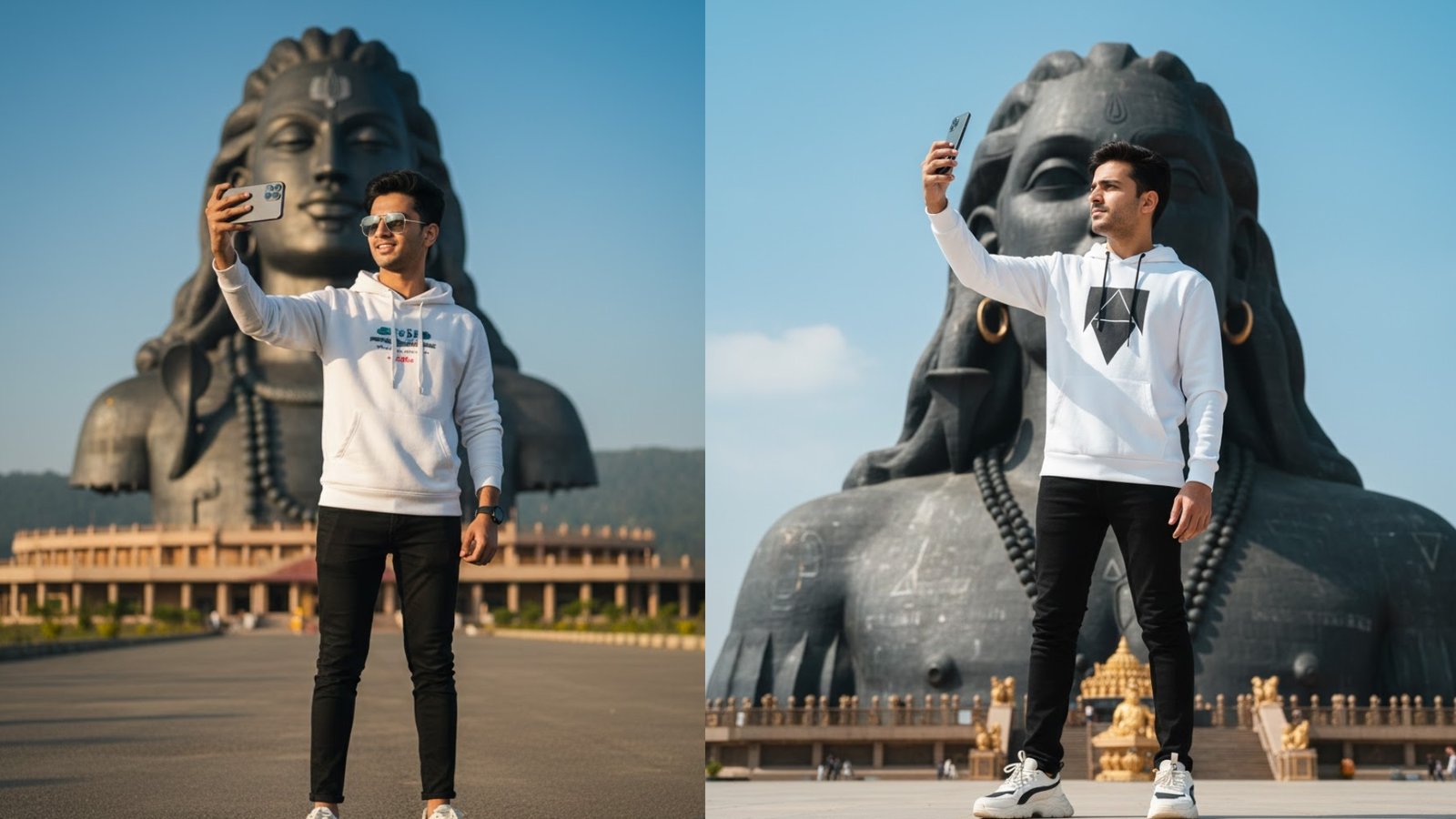
    Third, clothing details should be specific and modern. Listing items such as a white graphic hoodie, black slim-fit joggers, and stylish white sneakers helps Gemini generate a fashionable, contemporary look. The more precise the clothing description, the better the output quality.

    Next comes the location, which is a crucial part of realism. Mentioning “Adi Yogi Mahadev in Coimbatore, Tamil Nadu” grounds the image in a real, recognizable place. Gemini responds well to well-known landmarks, especially when the location is named clearly and correctly. This also helps scale and composition, ensuring the statue appears grand and dominant in the frame.

    The action in the image is equally important. Saying that the boy is taking a selfie with an iPhone 17 Pro Max gives Gemini a clear interaction. Including the phone model adds realism and modern context, while specifying “taking a selfie” helps Gemini choose the correct arm position and camera angle.

    Camera and visual style instructions should always come near the end of the prompt. Phrases like “crisp, cinematic DSLR photography style,” “realistic natural lighting,” and “4K clarity” tell Gemini to avoid cartoonish or painterly outputs. These terms push the model toward photorealism and professional photography aesthetics.

    Below is the exact prompt you should paste into Gemini:

    Prompt:
    “Without changing the facial features (Twar Edge), a young boy (17–18 years old) wearing modern casual clothes — a white graphic hoodie, black slim-fit joggers, and stylish white sneakers — is standing in front of Adi Yogi Mahadev in Coimbatore, Tamil Nadu. He is taking a selfie with an iPhone 17 Pro Max. The scene is captured in crisp, cinematic DSLR photography style with realistic natural lighting and 4K clarity, highlighting both the boy’s outfit and the grandeur of the statue.”

    When using this prompt in Gemini, paste it as a single block of text. Avoid adding emojis or unrelated instructions. If Gemini produces a square image and you want a vertical or horizontal one, you can add a final line such as “Portrait orientation, 9:16” or “Wide cinematic framing.”

    Finally, if the first result is not perfect, refine gently. Strengthen words like “ultra-realistic,” “sharp focus,” or “photograph-like,” but avoid changing the core structure. With clear identity locking, precise clothing, real location, and strong camera instructions, Gemini can generate highly realistic and visually impressive images.

  • How to Create a Cinematic Portrait Image in Gemini Using a Detailed Prompt

    How to Create a Cinematic Portrait Image in Gemini Using a Detailed Prompt

    To generate a high-quality cinematic photo in Gemini, it is very important to understand how to structure and use a prompt correctly. Gemini responds best when the prompt clearly explains the subject, clothing, pose, environment, mood, and camera style. The given prompt is already strong, but using it properly inside Gemini makes a big difference in the final output.

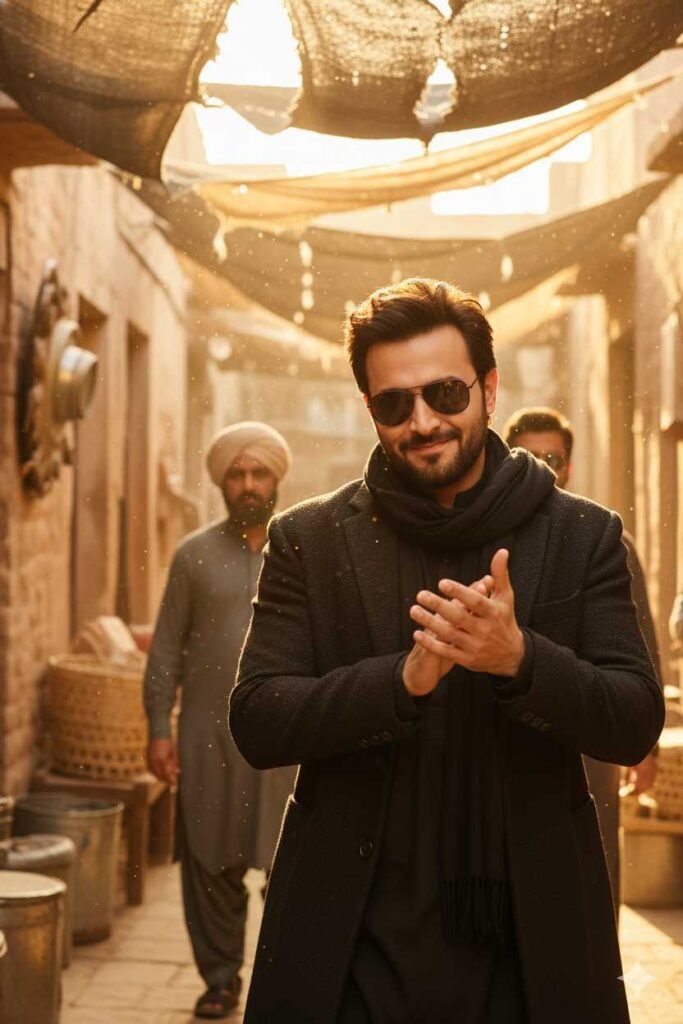
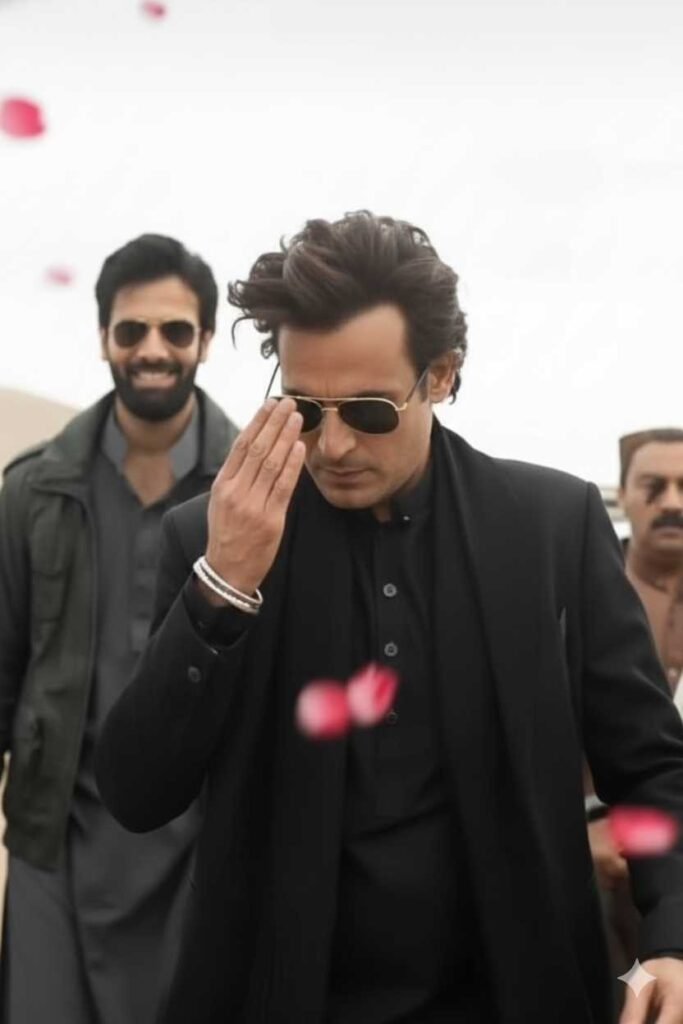
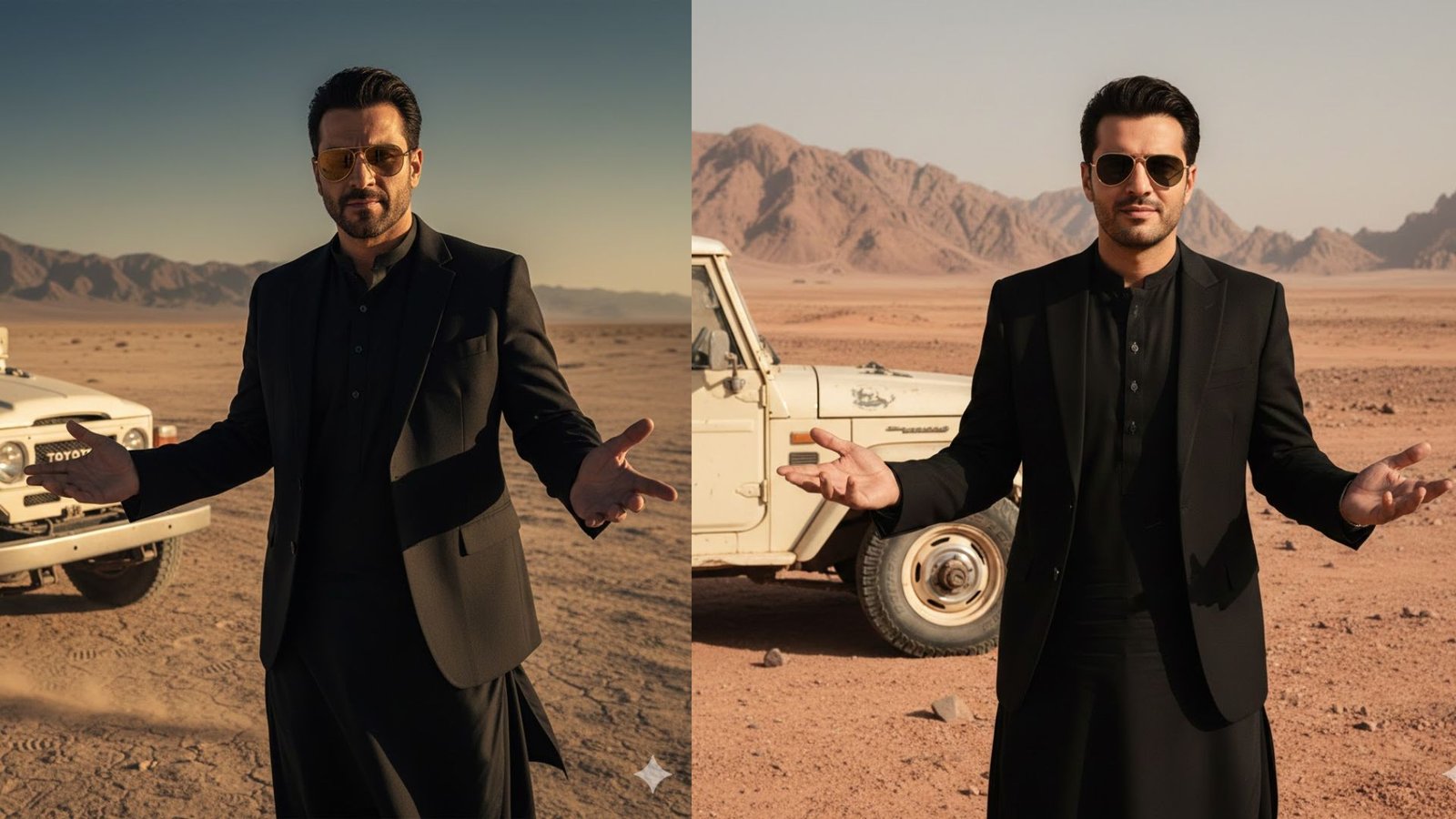
    The first step is to clearly define the main subject. In this case, the subject is a charismatic man wearing gold-rimmed aviator sunglasses. Mentioning specific accessories like sunglasses helps Gemini visualize the character more accurately. Describing his expression—such as confident or slightly smirking—adds personality and emotion to the image, making it feel more realistic and cinematic.

    Next, clothing details are very important. The prompt specifies a stylish black suit jacket worn over a black traditional tunic (shalwar kameez). This combination of modern and traditional clothing should be written clearly in one sentence so Gemini understands that both elements must appear together. Using words like “stylish,” “traditional,” and “black-on-black” helps guide the fashion tone and color palette.

    After the appearance, the pose and body language must be explained. In this prompt, the man is gesturing outward with both open palms in a “what can you do?” pose. This kind of descriptive body language is crucial because Gemini often struggles with gestures unless they are clearly stated. Mentioning that the pose looks confident or casual helps reinforce the emotion.

    The background and environment should be described next. Here, the setting is a dusty, desolate desert or mountainous terrain. Words like “dusty,” “desolate,” and “open landscape” help Gemini avoid urban or green environments. Adding environmental mood—such as harsh sunlight or dry air—can further improve realism.

    Including secondary elements is another important step. The partial view of a white vintage off-road vehicle, like a Land Cruiser, gives the image a cinematic storytelling feel. It’s important to specify that the vehicle should be partially visible and placed to the left of the subject so it does not overpower the main character.

    To get the best results in Gemini, you should also add visual style and quality instructions at the end of the prompt. For example, mentioning “photorealistic,” “cinematic lighting,” “high resolution,” and “sharp focus” helps Gemini generate a professional-looking image rather than an illustration.

    When entering the prompt into Gemini, paste it as one complete description rather than breaking it into multiple messages. Avoid adding unnecessary emojis or casual language. If Gemini generates a square image and you want a portrait or landscape format, explicitly mention the desired orientation like “portrait orientation” or “cinematic wide shot.”

    Finally, patience and minor adjustments are key. If the first result is not perfect, slightly refine the prompt by strengthening words like “ultra-realistic,” “dramatic,” or “editorial-style portrait.” Gemini works best when it is guided clearly but not overloaded with conflicting instructions.

    Using this structured approach, the given prompt can successfully generate a powerful, cinematic photo that looks confident, stylish, and story-driven.

    Prompt

    Charismatic, a man with a gold-rimmed aviator sunglasses. He is wearing a stylish black suit jacket over a black traditional tunic (shalwar kameez). He has a slightly smirking or confident expression and is gesturing outwards with both open palms in a ‘what can you do? pose. He is standing in a dusty, desolate desert or mountainous terrain. A partial view of a white, vintage off-road vehicle (like a Land Cruiser)is visible to his left.

  • A Dry Winter Comedy Scene from an Indian Village Household

    A Dry Winter Comedy Scene from an Indian Village Household

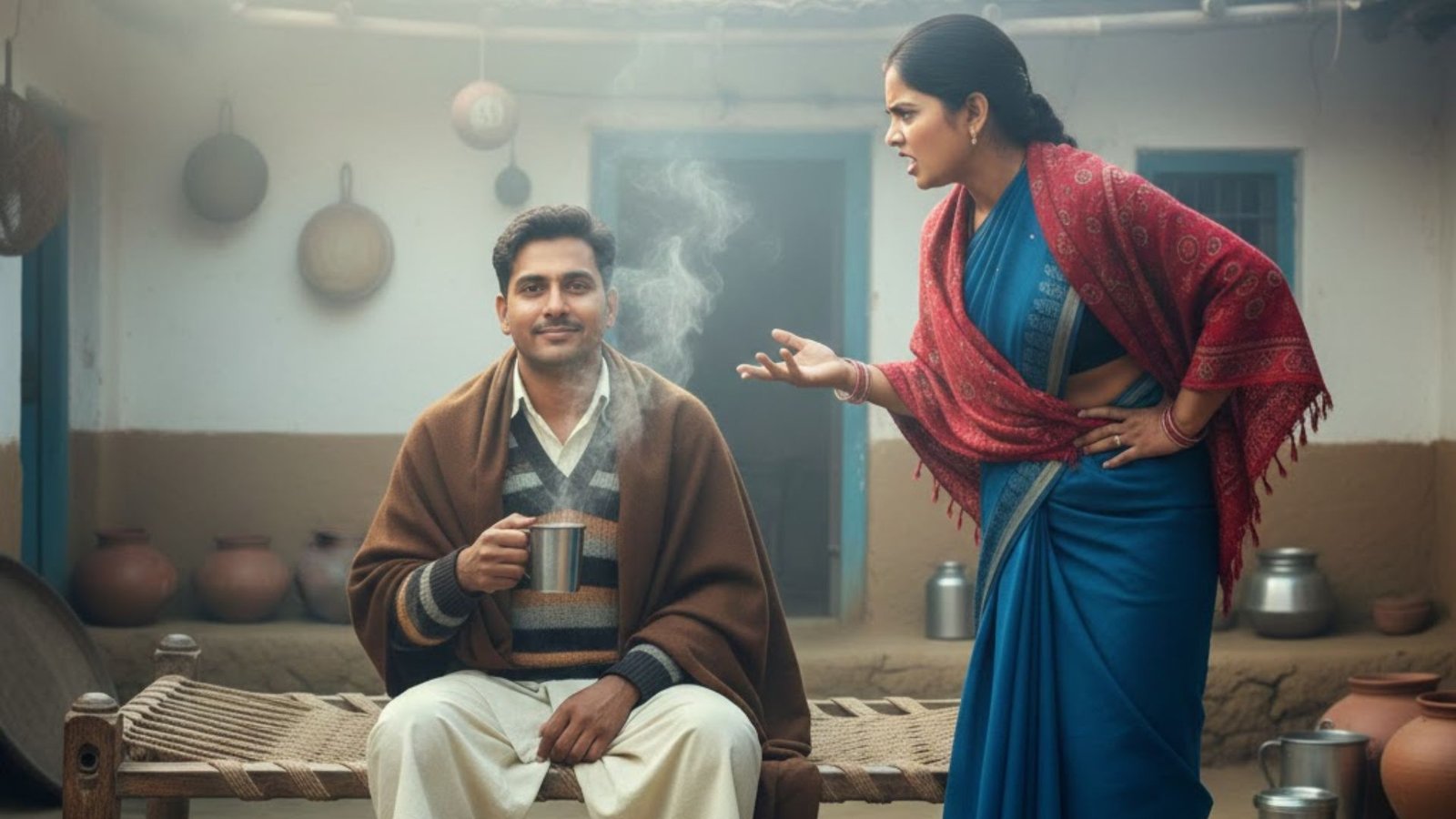
    This prompt represents a realistic and humorous moment from everyday life in an Indian village during the winter season. The setting is a traditional village house with a small open courtyard, mud-plastered walls, and a floor coated with cow dung, reflecting authentic rural architecture. The environment immediately conveys simplicity and warmth despite the cold weather. Elements like an old charpai, clay pots, steel utensils, and domestic animals nearby strengthen the village atmosphere and remove any urban influence.

    The season plays an important role in this scene. It is winter, and the cold is clearly visible through environmental cues such as soft pale sunlight, dry air, and steam rising from a steel glass filled with a hot drink. The winter setting adds realism and also becomes a key element in the humor of the scene.

    There are two main characters: a village woman and a village man. The woman, around thirty years old, is dressed in a simple cotton saree with a shawl wrapped tightly around her shoulders to protect herself from the cold. Her appearance is plain and natural, with no makeup or modern styling. Her body language is tense and aggressive, clearly showing anger and frustration. She stands firmly, often with one hand on her waist, maintaining sharp eye contact with the man. Her tone is strong and emotional, reflecting built-up irritation.

    The man, around thirty-two years old, is seated calmly on the charpai. He wears simple winter clothing such as a sweater over a cotton shirt, paired with a dhoti or loose pajama. A woolen shawl rests casually on his shoulders. Unlike the woman, his body language is completely relaxed. He is holding a steel glass and slowly sipping a hot drink, unconcerned by the seriousness of the situation. His calm demeanor creates a strong contrast with the woman’s anger.

    The comedy of the scene comes from this contrast. While the woman delivers a serious and emotionally charged Gujarati dialogue demanding separation, the man responds in a casual and emotionally detached manner. His reply is short, slow, and dry, directly referencing the winter season instead of the emotional topic. This mismatch between emotional intensity and casual response creates subtle village-style humor that feels natural rather than exaggerated.

    From a visual perspective, the camera remains static at eye level, focusing on facial expressions and reactions. There are no dramatic camera movements or cinematic effects. The simplicity of the framing helps highlight the emotional contrast between the characters. Background sounds such as light winter wind, distant cow bells, and village silence enhance realism without distracting from the dialogue.

    Overall, this prompt captures the essence of rural Indian comedy—simple settings, strong character contrast, and humor rooted in everyday misunderstandings. It is ideal for short-form AI-generated videos, reels, or storytelling content that relies on expression, timing, and cultural authenticity rather than exaggerated action. The scene feels relatable, grounded, and deeply connected to village life.

  • A Heartwarming Rural Comedy Scene Featuring Innocent Village Children

    A Heartwarming Rural Comedy Scene Featuring Innocent Village Children

    This prompt describes a simple yet emotionally rich comedy scene set in a traditional Indian village house, capturing the innocence of childhood and the raw charm of rural life. The setting is a typical village courtyard with mud-plastered walls, a cow-dung coated floor, and an old charpai placed in the center. Everyday village elements like clay pots, steel utensils, scattered toys, cows, buffaloes, and chickens moving around create a highly authentic rural atmosphere. The environment feels warm, natural, and deeply connected to village culture, far away from any urban influence.

    At the heart of the scene are two preschool children, a five-year-old boy and a five-year-old girl, both sitting together on the same charpai. Their closeness immediately establishes a sense of familiarity and comfort, common in village childhood friendships. The children are dressed in simple village clothes—nothing fancy or modern—reflecting realism and authenticity. Their appearance, body language, and surroundings emphasize innocence and simplicity.

    The boy is crying emotionally, clearly upset and confused. His expressions are exaggerated yet natural, with watery eyes and childlike gestures such as rubbing his eyes and slouching slightly. His crying is not aggressive but emotional, the kind that reflects confusion rather than anger. His Gujarati dialogue is delivered in an imperfect, childlike rural accent, adding to the realism and humor of the scene.

    The girl, sitting right beside him, notices his distress and reacts with genuine concern. Her body language is soft and caring—she leans slightly toward him and asks a simple question in Gujarati: “શું થયું?” Her tone is innocent, curious, and comforting, exactly how a five-year-old village child would respond. She is not panicked or dramatic, but naturally concerned, which balances the emotional tone of the scene.

    The humor of the scene emerges when the boy replies with his dialogue. His words, spoken through tears, reveal a misunderstanding rooted in childish logic. This contrast between the seriousness of his emotions and the innocence of his reasoning creates a light-hearted comedic effect. The comedy is subtle, not loud or forced, making it relatable and emotionally engaging.

    From a cinematic perspective, the camera remains static at the children’s eye level, using a medium close shot to focus on facial expressions and emotional interaction. There are no dramatic movements or effects—everything feels grounded and natural. Background sounds like birds chirping and distant cow bells enhance the rural setting without overpowering the dialogue.

    Overall, this prompt beautifully combines rural realism, innocent childhood emotions, and gentle comedy. It is ideal for creating short AI-generated videos, reels, or storytelling content that resonates emotionally while maintaining a strong village identity. The scene feels authentic, culturally rooted, and universally relatable, making it both humorous and heart-touching.