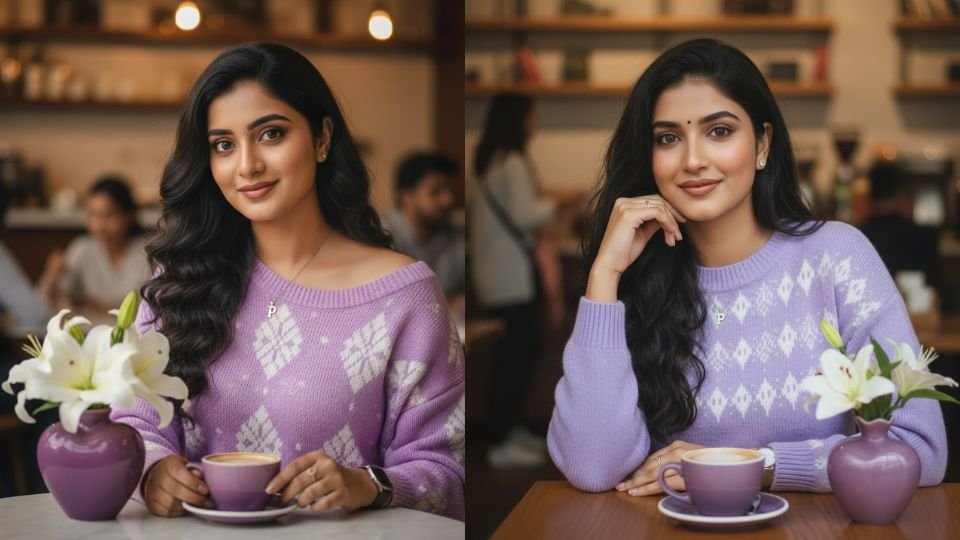
Generating a highly realistic portrait in Gemini—especially one that must closely match a real person’s face—requires careful prompt structure, clear identity instructions, and strong visual guidance. Gemini can produce excellent results when it is told exactly what must remain unchanged and what elements can be styled creatively.
The most important step is identity locking. When you want the generated image to match the uploaded photo exactly, you must clearly instruct Gemini to keep the face identical. This instruction should appear at the very beginning of the prompt so the model prioritizes facial accuracy over styling. Words such as “100% identical,” “same facial structure,” or “reference-accurate face” help Gemini understand that facial features must not be altered.
Next, define the expression and makeup style. A “soft sweet smile” immediately sets a gentle emotional tone. Describing makeup as “sweet dreamy brown tone” helps Gemini apply subtle, natural-looking cosmetics instead of heavy or dramatic makeup. Clear emotional and aesthetic cues prevent the image from looking artificial.
Hair details should be written clearly. Mentioning “long wavy hair” allows Gemini to add natural flow and softness to the portrait. Hair description is important because it frames the face and strongly affects likeness.
Clothing and accessories should be listed in a structured way. In this prompt, the outfit is a light bright purple knitted sweater with alternating white patterns and one shoulder exposed. This level of detail helps Gemini accurately design textures, colors, and fit. Accessories such as a necklace with a “P” pendant, a wristwatch, and a ring on the right index finger add realism and personality. Specifying which finger the ring is on reduces ambiguity and improves accuracy.
The environment adds storytelling value. A coffee shop setting creates a cozy, lifestyle mood. Including specific props—such as a heart-shaped purple vase with white lilies and a purple coffee cup—helps Gemini arrange the scene naturally and maintain color harmony. Small decorative elements often make the image feel more cinematic and intentional.
Image quality instructions are also essential. Terms like “ultra-sharp 8K image” tell Gemini to aim for maximum clarity, realistic textures, and professional photographic detail. While Gemini may not literally output true 8K resolution, these words strongly push it toward the highest possible visual fidelity.
Below is the exact prompt you should paste into Gemini after uploading the reference photo:
Prompt:
“Generate an image of a face that is 100% identical to the person in the photo, with a soft sweet smile, makeup in a sweet dreamy brown tone, ultra-sharp 8K image, long wavy hair, wearing a light bright purple knitted sweater with alternating white patterns and one shoulder exposed, wearing a necklace with a ‘P’ pendant, a wristwatch, and a ring on the right index finger, sitting in a coffee shop with a heart-shaped purple vase containing white lilies on the table, a purple coffee cup.”
When using this prompt, always upload the reference image first, then paste the prompt as a single block of text. Avoid splitting instructions across messages. If Gemini slightly changes facial features, reinforce identity by adding a short line such as “do not change facial structure, eyes, nose, or lips.”
By clearly locking the face, carefully describing styling and environment, and emphasizing ultra-realistic quality, Gemini can generate a polished, lifestyle portrait that looks natural, expressive, and visually stunning while staying faithful to the original person.
Leave a Reply